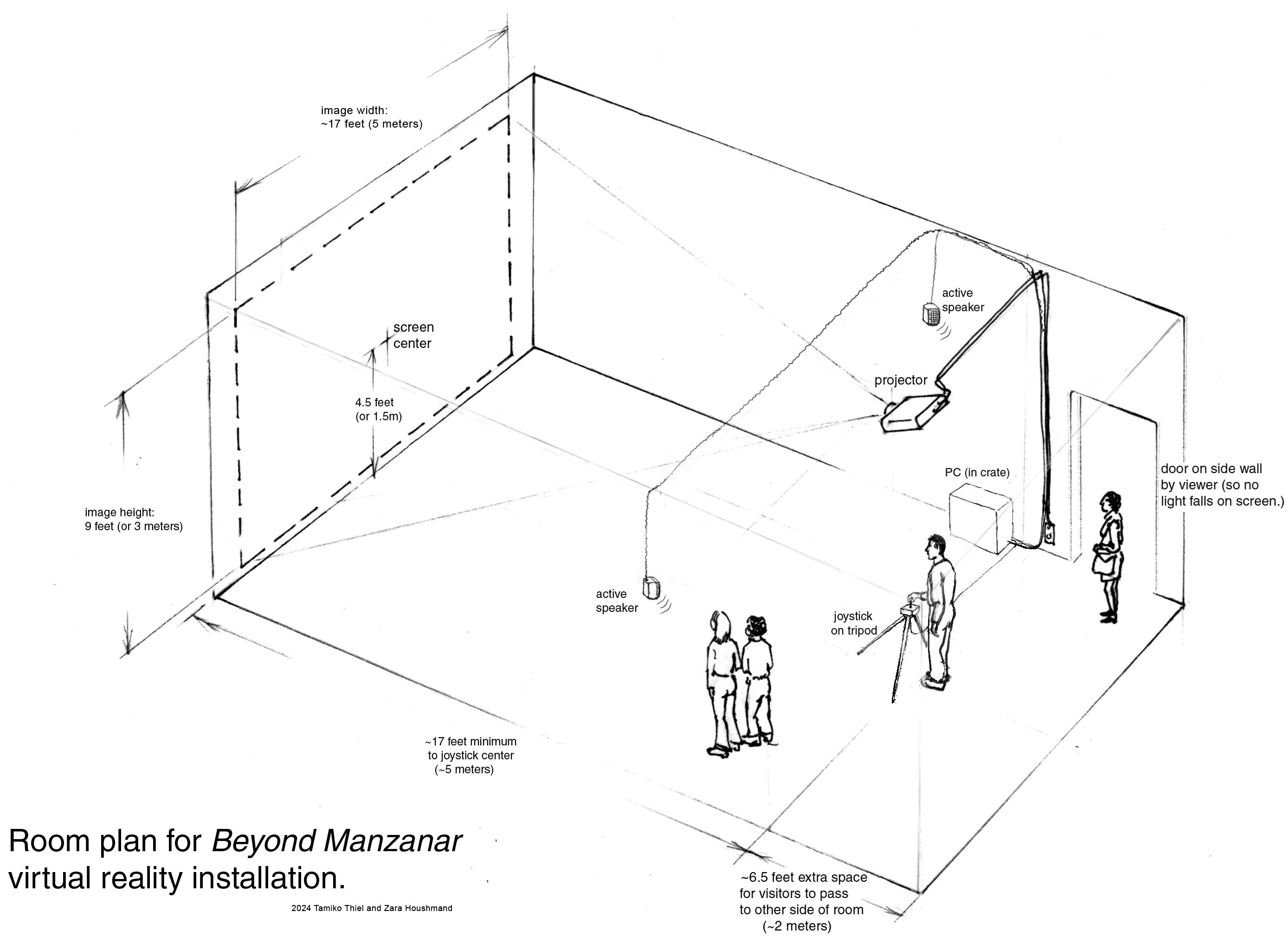
Hardware and software:
We will provide:
- Beyond Manzanar code
- VRML 3D browser code
- Modified joystick as navigation device
We ask the venue to provide the following hardware & software:
Projector:
- Data projector capable of taking input from a PC.
- Capable of projecting an image 3m high by 5m wide (9' by
17'.)
Specs should indicate it can handle a screen size of 5 m diagonal
(17' diagonal,) which is larger than the normal consumer grade.
- Ceiling mounted with keystone distortion compensation to
avoid a distorted image.
- The large image size requires a projector of ideally 5000 ANSI lumens,
which is brighter than the normal consumer grade, and a contrast ratio of 2000:1.
Speakers:
- Large, active PC stereo speakers with good sound quality (good dynamic range).
Ideal: 40 Watt, with frequency range 55 Hz – 20kHz
- Ceiling or wall mounting brackets and cables as needed. Speakers should be mounted near and
slightly in front of thethe joystick tripod, so that the sound can be kept as low as possible and still be
heard well by the user.
PC:
- Windows 10 or Windows 11 PC (does NOT run under Mac or Unix operating system!)
- Mouse and keyboard (needed to boot program, but hidden during the
exhibit.)
- Note: the PC should be offline, NOT connected to the Internet. All programs that might automatically pop up and take
focus away from the joystick must be disabled! This includes the Windows
Desktop cleaning assistant, screen saver, energy saver, virus scan
auto-updates, and any other programs with automatic updates.
Fixtures:
- Simple wooden tripod built to our specifications. If tripod cannot be screwed to the floor, there must be a floorboard (roughly 1.2 meter square (4' square) to which the tripod is fixed. There must be a non-skid rug pad underneath the floorboard to keep it from shifting.
- If possible, room filled with sandy gravel (not necessary, but desireable if doable).
|